← Back to home

Scheduling the season on the calendar

Updated on 2026-11-01

For:Touring operator guide

What you will do

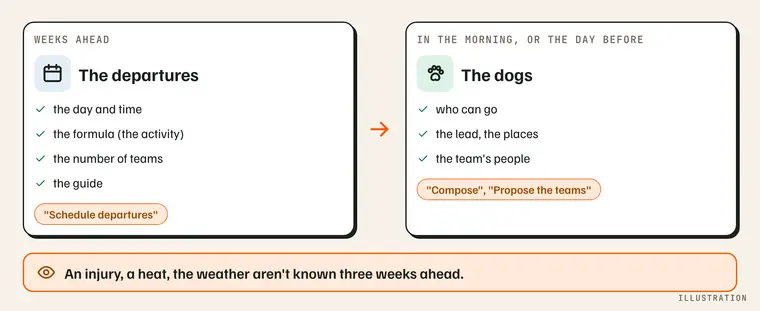
Weeks ahead: the departures; in the morning: the dogs. Illustration.

What you need

Step by step

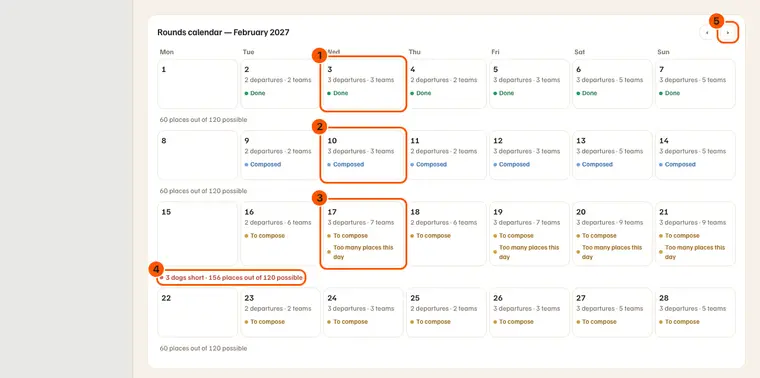
  1. Open the season: it opens on its calendar, in the season's month. The month's calendar: a day done (1), composed (2), to compose and overloaded (3); a week short of dogs (4); the next month (5).
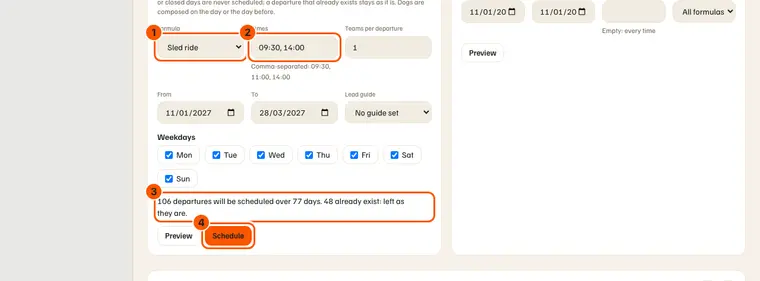
  2. "Schedule departures": a formula (1), its times (2), the weekdays, from… to… — then "Preview" (3), then "Schedule" (4). The filled form and its preview: 106 departures over 77 days, 48 already there, left as they are.
  3. A thaw week: "Cancel departures" over the range, with the same preview.

What you should see

  • Each day: Done, Composed, To compose or Closed.
  • Under each week: its places, or "N dogs short".

What it does not do

  • No template week: "Schedule" creates real departures. To change the rhythm: cancel the range, schedule again.
  • Never a past, out-of-season or closed day; a done departure is never cancelled.

If something goes wrong

  • "Schedule" greyed out: ask for the preview first.
  • More than 2,000 departures: in several ranges.

Going further