What you will do
Bring new kennels into your club with a code or a link, remove a member, and know what happens when a kennel leaves the club.
What you need
- To be the club's founding kennel, and the owner of that kennel: only the founder generates codes and removes a member.
- The musher you invite doesn't need to have MushMate: the link makes them create their account and kennel along the way.
Step by step
- Open Team › Club › Members. The list of member kennels shows, sorted by name, with each one's all-time kilometres, its region, the date it joined and a "Founder" badge on your kennel.
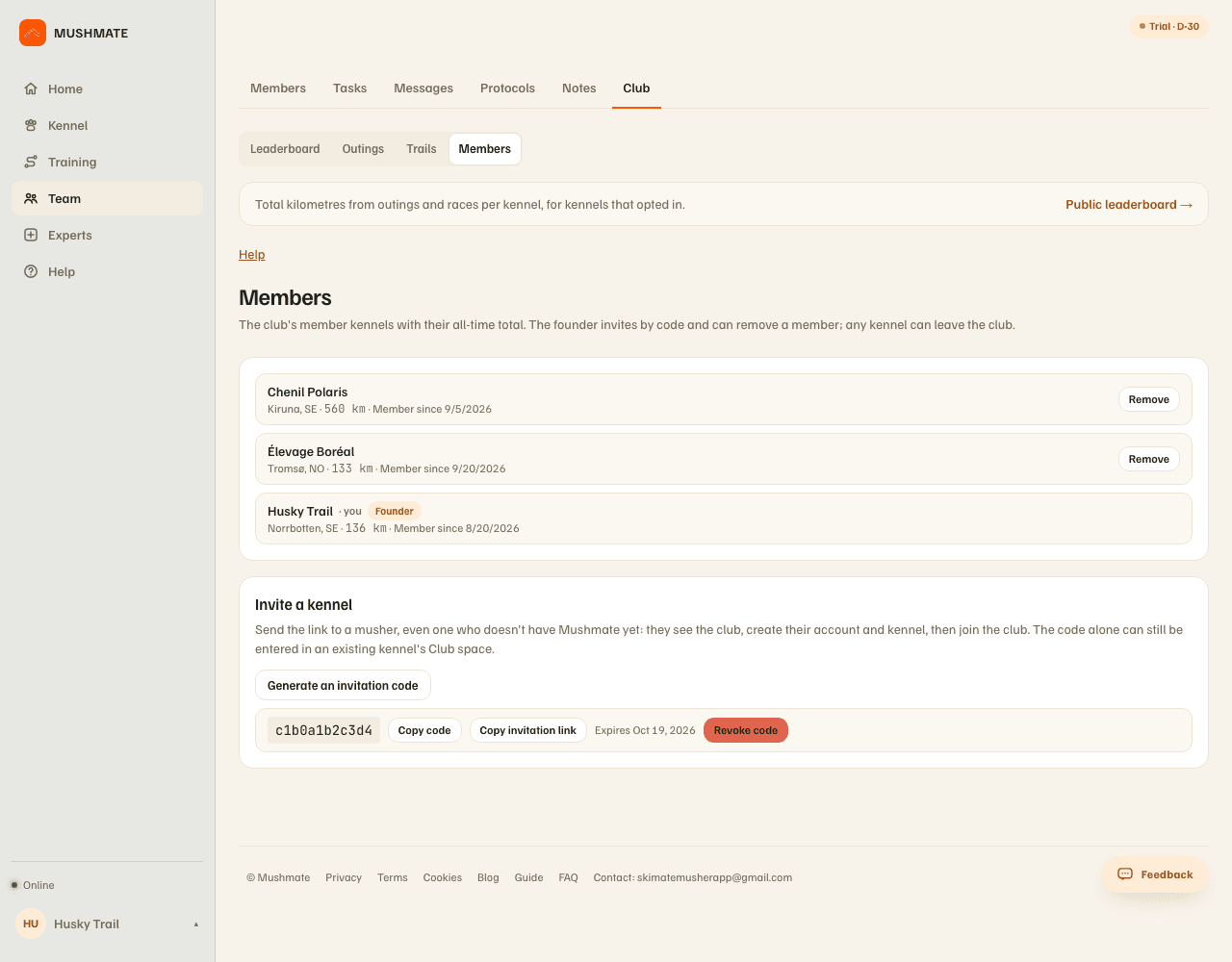
- Click "Generate an invitation code". The code is valid for 14 days and reusable by several kennels; its expiry date shows.
- Send it: "Copy invitation link" gives the address to paste in a message — the simplest, including for a musher who doesn't have MushMate yet; "Copy code" gives the code alone, which is typed in an existing kennel's Club space.
- The musher opens the link, sees the club and what joining commits to, creates their account and kennel if needed, then confirms with one click. Their kennel appears in your list.
- To stop inviting, "Revoke code": the link stops working at once.
- To remove a kennel, "Remove" on its row.
What you should see
- A new kennel in the list with the date it joined, and in the leaderboard.
- An expired or revoked link that only says it is no longer valid, with no name.
- The number of kennels of the club up to date on the invitation link and on the public page.
What others see
- The invited kennel sees, before accepting, the club's name, its number of kennels and what "joining" commits to — not the other members' names.
- The other members see the new kennel in the list and the leaderboard: name, region, kilometres.
- A kennel that leaves or is removed disappears from the leaderboard, and takes its trails away; its outings stay its own.
What it does not do
- Removing a kennel also revokes all active codes: you have to generate a new one to invite again.
- A code isn't personal: any owner who has it can join for 14 days — don't publish it.
- The founder can't remove itself from this screen.
- Coming back to a club re-shares nothing: trails and the "Show my times to the club" agreement are redone, one gesture at a time.
If something goes wrong
- The musher says the link no longer works: it is older than 14 days, or you revoked it. Generate a new code.
- You don't see "Invite a kennel": your kennel isn't the founder, or you aren't its owner.
- A member was removed by mistake: it can come back with a new code; its kilometres stay with it, and it is back in the leaderboard.
- On the phone, the founding kennel also manages the invitation codes there, removes a member and sets the search visibility; the invitation link opens in the browser.
Going further
- Founding a club or joining your team's.
- Club and leaderboard: the complete reference.