What you will do
See at a glance which athlete needs a gesture, then read where one of them stands: what they did of the week you wrote, their dogs' form, what they said about it.
What you need
- A Pro account that offers coaching, and an active coaching with the athlete.
- For the numbers: an active plan on their goal, and recorded outings.
Step by step
- Open “My athletes”. The title says how many are “to handle”, and the list puts them first: an open injury (Health), feedbacks with no reply, an empty week, a plan barely kept. Each row gives its reason, or Ok, and the plan kept over 4 weeks. On the phone, the “To handle” / “All” filter sorts the same way.
- Open an athlete. Under their name, “Athlete follow-up”:
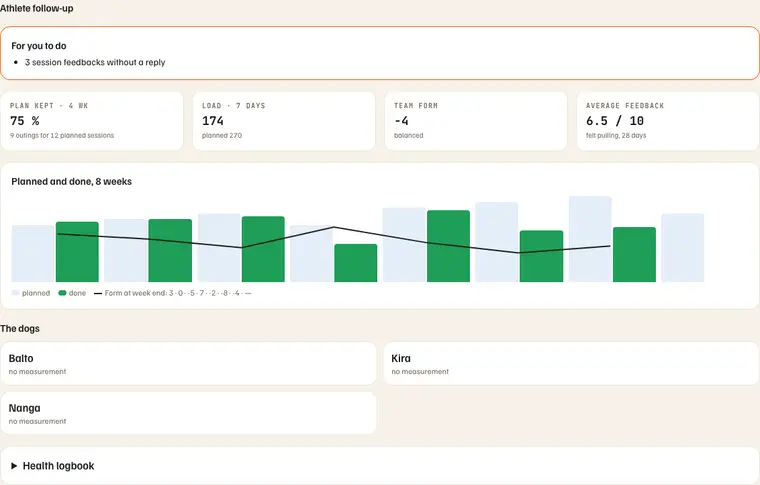
- Read “For you to do”. One line per expected gesture, for example “3 session feedbacks without a reply”.
- Read the four numbers. With the example in the picture — three dogs, a plan of three sessions a week:
- Plan kept · 4 wk — the outings done over the last 28 days, against the sessions the plan had on those days: 9 outings for 12 planned sessions = 75 %. Capped at 100 %.
- Load · 7 days — the dogs' training load over the last 7 days (today included), done, then planned by the plan: 174, planned 270 — two outings out of three, a little shorter.
- Team form — the mean of the latest measured form of each active dog (a retired dog does not count): here −4, “balanced”. Negative: the dogs carry fatigue; positive: they are fresh. On the phone, the same form is given out of 100: 42 / 100 (50 = neither fresh nor tired).
- Average feedback — the pulling the athlete felt and noted after their outings of the last 28 days: 7, 8, 6 and 5 → 6.5 / 10. Older feedback does not count.
- Read the “Planned and done, 8 weeks” curve. Per week, the light bar is the planned load, the green bar the load done; the black line is the form at week end. The last week is the coming one: planned only. Below the figure, each week's form is written out (“3 · 0 · −5 · 7 · −2 · −8 · −4 · —”).
- Scroll down: their dogs, their logbook. For each dog: body condition, weight, resting or not. The first eight and any resting dog show; “Show the N other dogs” unfolds the rest. The whole health logbook unfolds, read only.