← Back to home

Reading the feedback, sharing resources, extending

Updated on 2026-10-19

For:Coach guide

What you will do

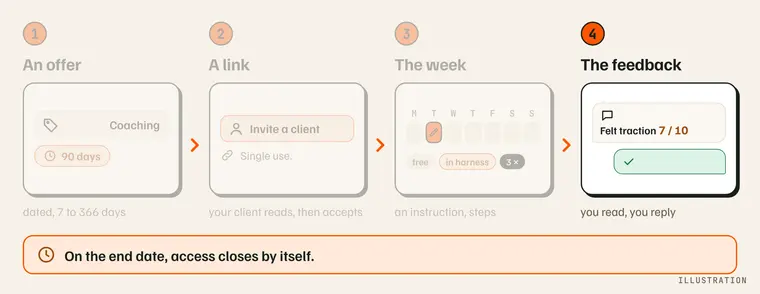
The coach's path, with the “The feedback” step highlighted: you read, you reply. Illustration.

Read your athlete's feedback, reply, share a resource, and propose an extension.

What you need

  • An active accompaniment with this athlete.
  • For feedback: a run by your athlete that followed a session of the plan, and their phone up to date.

Step by step

  1. Open your athlete's page (“My athletes”, then their kennel), down to the sessions from the last 8 weeks. The four most recent show, plus any session whose feedback awaits your reply; “Show the N other sessions” opens the rest. A dog's weight is logged under “Log a weight”, folded under each session.
  2. Read the feedback. Under the session: pull, drive at the start and at the finish, recovery, pads, and two free-text lines. The musher's feedback (1) and the coach's reply (2).
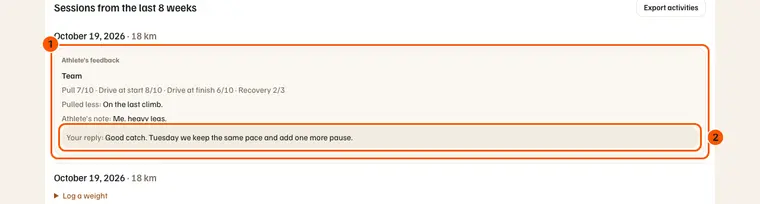
  3. Reply. Your text shows under the feedback, on your athlete's side.
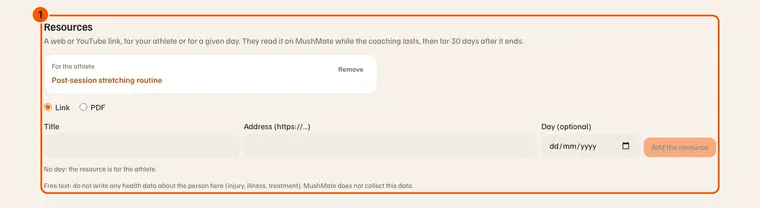
  4. Share a resource. A web or YouTube link, or a PDF, for your athlete or for a given day. The “Resources” section: the shared resource, and the form to add one (1).
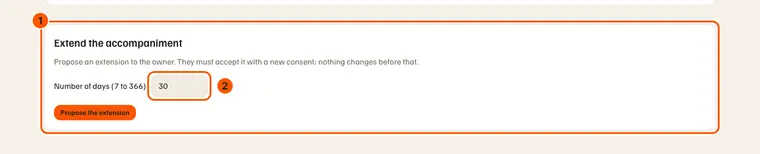
  5. Propose an extension of 7 to 366 days: your athlete must accept it. “Extend the accompaniment” (1) and the number of days (2).
What you should see

  • Under a session with no feedback yet: “Feedback expected”, then “No feedback” after 7 days.
  • Your reply, under the feedback: “Your reply: …”. Your athlete reads it under “Your coach's reply”.
  • A pending extension: “+N days (until …)”, with “Withdraw the proposal”.

Your athlete's follow-up

At the top of each athlete's page, under their name: “For you to do”, four numbers (plan kept, 7-day load, team form, average feedback), the planned and done over 8 weeks curve with the form line, their dogs and their whole logbook read only. What each number means, on an example: Following your athletes.

What others see

  • Your athlete reads your reply and your resources. A resource stays readable 30 days after the end of the accompaniment.
  • Your athlete accepts or declines the extension, with a new dated consent, on the website or on the phone.

What it does not do

  • The feedback does not enter the dogs' load: MushMate does not read it in its calculations.
  • Pads “to watch” is a note for you, not a health signal: no alert comes out of it.
  • No health data about the person: MushMate does not collect it.
  • An extension changes nothing before acceptance, and your athlete's access coupon follows the new date.
  • After the end date, you read nothing more from this kennel, neither feedback nor sessions.

If something goes wrong

  • “Feedback expected” does not change: the run did not follow a session of the plan, or your athlete has not updated their phone.
  • “Sending failed”: try again, the reply did not go out.
  • “A proposal is already pending”: withdraw it to make another.
  • “The accompaniment is no longer active”: the end date has passed, the athlete removed access, or you ended it.
  • A PDF over 10 MB is refused: make it smaller.

Going further