What you will do
Make the plan fit your real week: close a day when the kennel is unavailable, change a session, answer a proposal from MushMate, or take the plan in your hands so it is never rewritten without you again.
What you need
- A goal with a plan. See Creating a season and a goal.
- The owner role to close a day, edit a week or switch to "In my hands" (a vet can also regenerate); other roles read.
Step by step
- Open the goal and the "Plan" tab. The "‹" and "›" arrows change week.
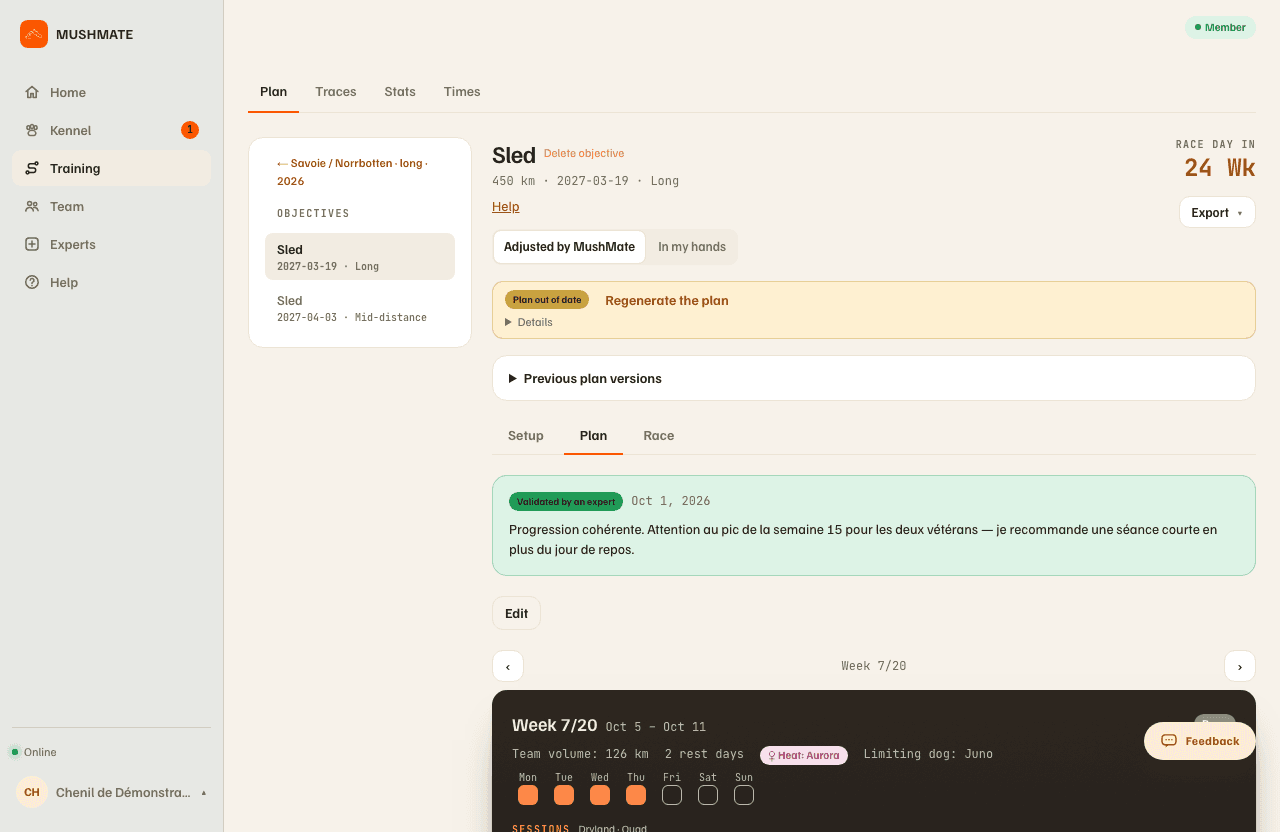
- Close a day: in the week's day-by-day breakdown, click the day when the kennel is unavailable. The session that was on it is removed at once. Reopening it gives no session back: a regeneration does.
- Change a session: "Edit" opens the editing of the displayed week. Each session's distance changes on its row, with no window; "Edit session" opens its six settings (the day, the distance, the maximum pace, the zone, the surface, the method); "+ Session" adds one. Every change is saved at once.
- Answer the banners when reality drifts from the plan: "Regenerate the plan from actual load" recalculates on what your dogs actually took; a "A proposal is waiting for you" card lays out the coming weeks: "Take the proposal" applies it, unticking a week keeps it as it is, "Keep mine" refuses it.
- Take the plan in your hands: under the goal's title, switch the selector from "Adjusted by MushMate" to "In my hands". One click, with no confirmation, both ways.
- Find a previous plan again: the "Previous plan versions" panel keeps the last three plans and a "Put back in service" button.
What you should see
- A "modified" plan as soon as you touch it: a regeneration then asks for confirmation ("Save and regenerate" or "Save without regenerating", which keeps your changes), and MushMate offers to keep it in your hands.
- On an "In my hands" plan: an "In my hands" pill on the goal's card; the banners keep their alert, but their button becomes "Edit the plan"; closing a day no longer triggers a realigned proposal.
- A plan never rewritten without you: MushMate no longer regenerates it and no longer offers to change it.
What others see
- The members of your kennel read the state ("Adjusted by MushMate" or "In my hands") but don't change it; only the owner switches.
- An expert who validates your plan sees the plan as it is: a badge above the plan says whether it was validated, is in progress, or changes were asked for.
What it does not do
- In my hands, MushMate does not rebalance: a distance you change moves no kilometre to another day, and the following weeks don't adjust.
- Going back to "Adjusted by MushMate" changes nothing in the plan: it stays as it is until you regenerate it.
- You need a plan to switch to "In my hands": the mode takes over an existing plan, it doesn't create one.
- Nothing regenerates by itself: the banners propose, you click.
- Closing a day on an "In my hands" plan no longer triggers a realigned proposal: on the web, the day's session is removed; on the phone, the day closes and the session stays in the plan. Either way, putting it back elsewhere is up to you.
If something goes wrong
- You closed the wrong day: reopen it; the removed session doesn't come back by itself — "Regenerate" or "+ Session".
- "Plan out of date": a dog of the plan was injured, put under treatment or changed age bracket since the generation; the button regenerates the plan on the spot — on an "In my hands" plan, it becomes "Edit the plan".
- A run recorded at an impossible speed skews the calculation: the banner says so; fix the data before regenerating.
- On the phone: the Objective screen carries "Close a day" (the "Actions" menu, owner), "Edit the plan" (one week at a time, online only) and the switch to "In my hands".
Going further
- Creating a season and a goal: starting over from zero.
- The training plan: the complete reference ("Why this plan", milestones, export, race file).