What you will do
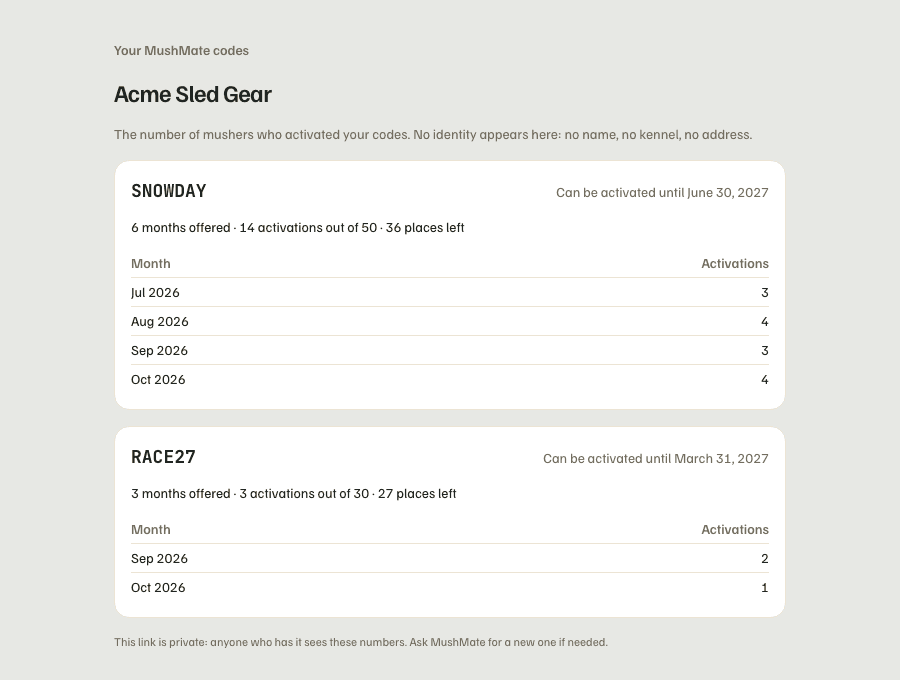
Open your private page to see where your code stands: how many mushers activated it, how many places are left, and the pace month by month. It is the only page MushMate gives you; it only contains numbers.
What you need
- Your private link, handed over by the MushMate team along with your code. It looks like
mushmate.eu/partenaire/followed by a long string of letters and digits. - Nothing else: no account, no password. The link is enough — which is exactly why it is private.
Step by step
- Open your link, on a computer or a phone. The page opens on your partner name.
- Find one block per code. If you have several codes (one for a fair, one for a race), each has its own card and counter.
- Read the status line of the code, to the right of the word: "Can be activated until …" while it works, "Expired on …" once the deadline has passed, "Code switched off" when the team stopped it.
- Read the figures line: "6 months offered · 13 activations out of 50 · 37 places left".
- Read the "Month / Activations" table: the number of activations of each month, to see what a newsletter or a race brought.
What you should see
- A figure that goes up with each activation, a number of places that goes down accordingly, and one more month in the table when the first musher of the month activates.
- A code that hasn't served anyone yet shows zero activations and no table: nothing is broken.
What others see
- Nobody but you sees this page… as long as the link stays in your hands: anyone who has it sees these figures. Don't publish it, don't put it in a newsletter. It isn't indexed by search engines.
- Mushers know what you receive: your code's page, before any sign-up, tells them you only receive the number of activations — never their name, their kennel's name or their address.
What it does not do
- Never a name: no musher, no kennel, no e-mail address, no region. No list of activations: the page doesn't contain them, and the database doesn't return them to this link.
- Never a precise date: the table counts by month, not by day or hour. A low figure in a month points to nobody.
- No amount: the page shows neither price nor invoice. Billing is handled with the MushMate team, according to your agreement.
- No "how many subscribed afterwards": that figure exists for the MushMate team, it isn't on your page.
- No editing: the page is read-only. Changing a cap, a date or switching a code off goes through the MushMate team.
If something goes wrong
- "Page not found" (404): the link was copied wrong, or it was replaced. The MushMate team can regenerate your link: the old one stops working at once. An archived partnership also loses its link. Ask the team for a new one.
- The link fell into the wrong hands: ask for a new link, the old one dies immediately. Your codes don't change.
- A figure surprises you: write to the MushMate team, who see for each activation the date and the kennel (a dispute is settled on that side); you stay without a name.
Going further
- Giving a code to your mushers: the link, the musher's steps, the refusal messages.
- What your mushers see.