What you will do
Activate a partner's code — a gear maker, a race organiser, a club — so that your kennel gets months of full access with no credit card. The offered months come on top of what is left of your trial: activating early or late gives the same end date.
What you need
- The code: a word (
NONSTOP) or the partner's address (mushmate.eu/code/NONSTOP). It is typed as it comes: capitals, accents, spaces and hyphens don't matter. - To be the kennel's owner. The access belongs to the kennel, and the whole team benefits; another member sees the offer but cannot activate it.
- Not to be already subscribed. A kennel whose trial has ended and which went read-only can activate a code.
- On the website, on Android or on iPhone: the gesture isn't the same on iPhone (see below).
Step by step
On the website
- Open the partner's address — or, from an account with a kennel, Settings › Kennel › Partner code.
- Without an account, click "Create my account": the code is kept during sign-up, then applied as soon as your kennel is created — you have nothing else to do.
- With a kennel, click "Activate for <your kennel>" (or type the word under "I have a code" in Settings, then "Activate").
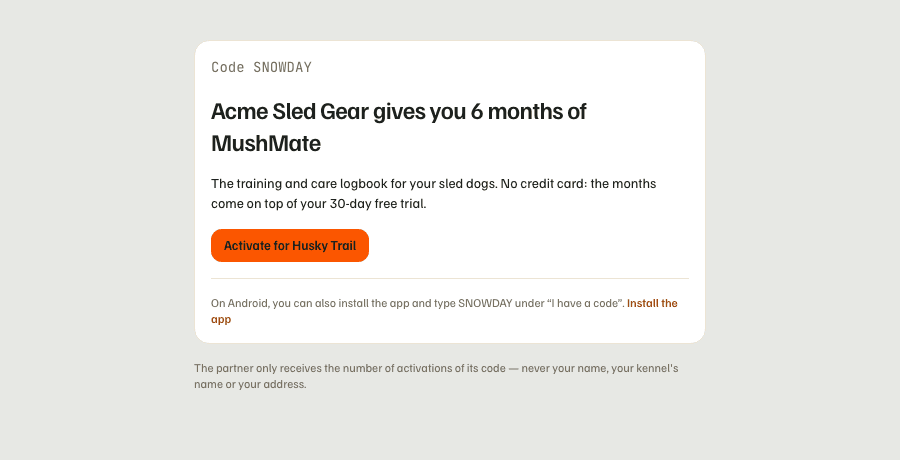
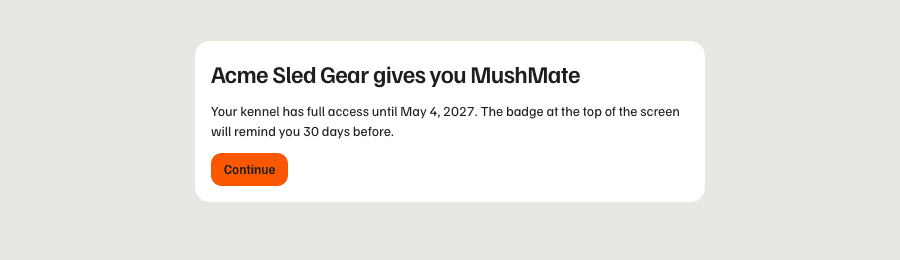
- Read the confirmation: what is offered to you and until when.
On Android
- Tap "I have a code": on the sign-in screen before even having an account, then, later, in Settings, on the subscription screen or on the read-only banner.
- Type the word in "Your code" then tap "Check": the app tells you what the partner offers you, before asking you for anything.
- Without an account, "Create my account"; without a kennel, "Create my kennel": the code applies at creation. With a kennel, "Activate".
On iPhone
The iPhone app has no field for the code: Apple forbids an app from unlocking access with its own code. Open the partner's address in the phone's browser and follow the "On the website" steps: the app then reflects the access, as for a subscription.
What you should see
- Right away: the pill at the top of the screen changes to "Member", and an "Offered by Non-stop dogwear" line appears next to it (on the phone, under the MushMate logo on the home screen and in Settings).
- In Settings, the "Partner code" card becomes the partner's: its name, its sentence, the end date and a link to its website.
- In the last 30 days, the pill changes to "Comped · D-N"; in the last 14, the line becomes "N days left, offered by …".
What others see
- The members of your kennel see the same "Offered by …" line: the access is the kennel's.
- The partner only receives the number of mushers who activated their code — never your name, your kennel's name or your address.
- Nobody else: the signature appears neither on your shared outings, nor on your kennel's public page.
What it does not do
- No credit card, nothing that renews. When the offered months end, your kennel goes back to the usual rule: you subscribe, or it becomes read-only (your data stays readable and exportable), exactly as at the end of a trial.
- No stacking: a kennel has one partner offer at a time, and an account activates a code once.
- Not for an already-subscribed kennel, nor for lifetime access: the code is made for new mushers.
- No influence from the partner: they choose neither your rations nor the recommended gear, and they don't write to you.
- Not in the iPhone app: only the partner's address, in the browser, activates a code.
If something goes wrong
- "This code does not exist": check the spelling;
0andOget mixed up. - "This code is no longer active" / "This code has expired": the partner's campaign is over. Ask them whether they have another code.
- "All the places offered by this partner have been taken": the partner's cap is reached.
- "Only the kennel's owner can activate this code": ask the owner to do it; the whole team will benefit.
- "This code is for new mushers": your kennel already subscribes.
- "You have already used this code" or "Your kennel already has a partner offer running": one code at a time, one trial per account.
- "Too many attempts — try again in an hour": more than ten tries in an hour; a code is typed, not guessed.
- "The demo account cannot activate a code": sign in with your own account.
Going further
- Settings and subscription: the access pill, the subscription and the backup.
- What your mushers see — partner side: the partner's card and the end reminder.
- FAQ: the code and the subscription.