What you will do
Have a puppy (or an adult dog) leave with its logbook: you create a link, you send it to the buyer, and they receive a copy of the logbook in their own MushMate. You keep yours.
What you need
- The kennel owner role, with full access: another member doesn't even see the gesture.
- A living or departed puppy (not a dead one, or one kept in the kennel). For an adult dog: its sheet in the pack.
- A buyer who has — or will create — a MushMate account: they need one to receive the logbook. Otherwise, the printed handover sheet is still useful.
Step by step
A puppy
- On the puppy's row, click "Hand over the logbook". A window sums up what leaves with it, what never leaves and what you will see afterwards.
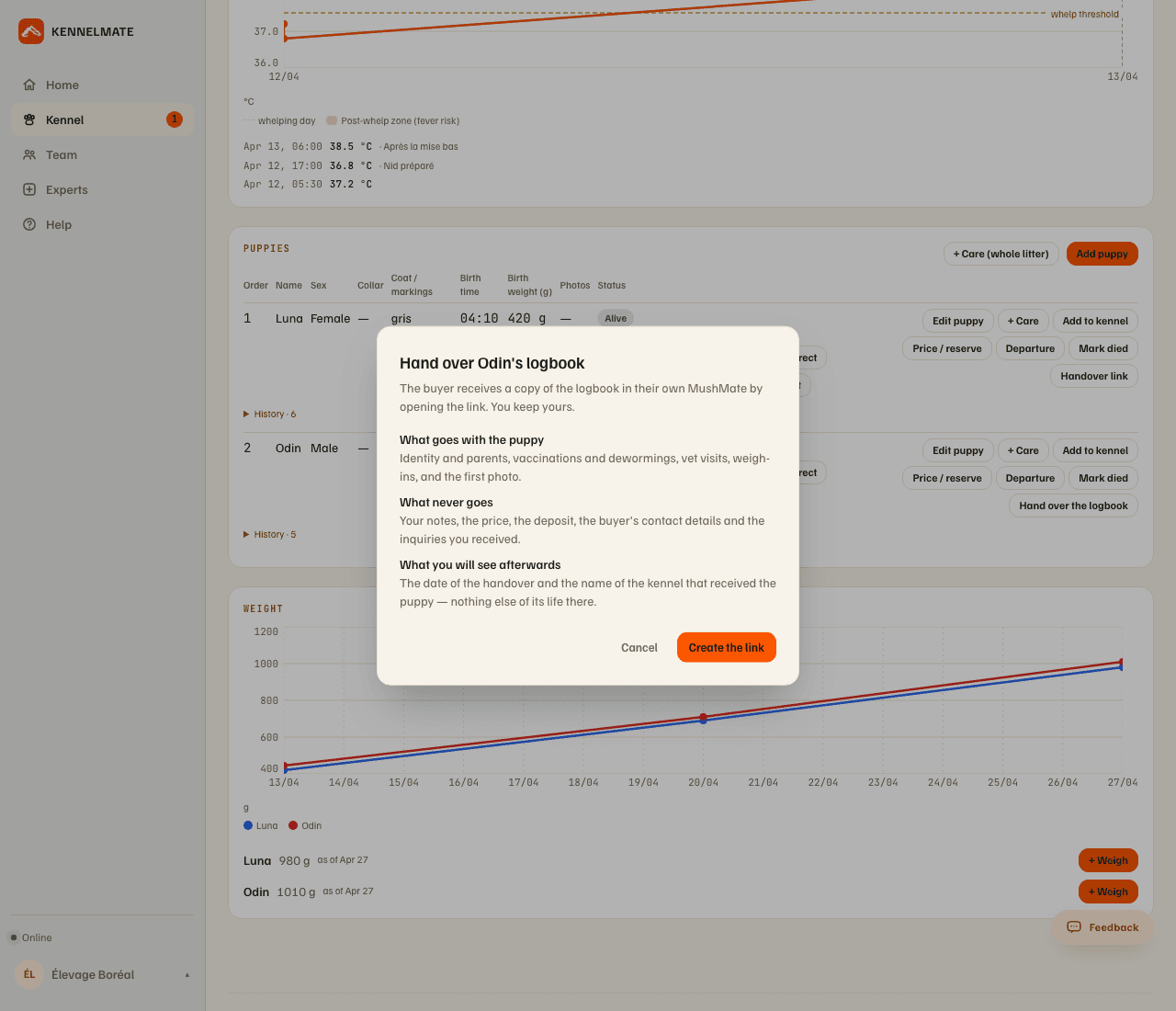
- Click "Create the link". The link is valid for 30 days, for a single acceptance; the puppy's row reads "Handover link valid until …".
- Send it yourself — share or copy — to the buyer: MushMate writes to nobody.
- The buyer opens it, reads what arrives with the puppy, creates their account and kennel if needed, then receives it. See What the buyer sees.
- You then read "Logbook handed over on … to {kennel}" on the puppy's row: the date and the kennel's name, nothing else.
- A link that hasn't been used can be withdrawn: "Withdraw the link" (the row's "Handover link" button opens the window). A link already accepted can no longer be withdrawn.
An adult dog
- On its sheet, open "Sell or give away by link…" (web: Profile tab, "Dog management"; phone: "Edit").
- Choose how it leaves — Sold, Given or Rehomed — then "Create the link". The dog moves to this status at your place when the other kennel accepts, not before.
- Send the link: it is valid for 30 days, for a single acceptance.
What you should see
- On the puppy's row: first "Handover link valid until …", then "Logbook handed over on … to {kennel}" after the acceptance; no more link to create afterwards.
- For an adult dog: on its sheet, "Sale link pending", the sheet saying "Sale link valid until … — the dog stays with you until someone accepts it"; after the acceptance, "Left with their logbook on …, to {kennel}", and its status changes at that moment.
What others see
- The buyer receives a copy of: the identity and parents, the vaccines, dewormings and visits, the weighings, the first photo (for a puppy); for an adult dog, also its injuries, treatments, heats and its whole training career, one line per run or race, with the team size.
- You never see its life at their place: only the date and the name of their kennel.
- A handler or a vet of your kennel sees nothing of the handover, neither the gesture nor its state.
What it does not do
- It isn't a transfer, it's a copy. Your logbook stays with you.
- It doesn't change a puppy's status. Its departure is still noted with "Departure" (date, reason Sold, Given or Other, recipient, price). Handing over the logbook is a separate gesture.
- Never your notes, the price, the deposit, the buyer's contact or the inquiries. For an adult dog, never either the visit costs, the insurance, the GPS tracks, the other dogs of your runs or the Strava-imported runs.
- A puppy is handed over only once, and a dead puppy, or one kept in the kennel, isn't handed over.
- No automatic sending: the link is yours, you send it.
If something goes wrong
- The buyer says the link no longer works: it may be older than 30 days, or you withdrew it, or it has already been used. Look at the puppy's row: if it offers "Hand over the logbook" again, create a new link; if it shows "Handover link valid until …", the link is still valid — send it again with "Share the link"; if it shows "Logbook handed over on …", it has already been used.
- "Hand over the logbook" is refused: "Only the kennel's owner, with full access, can hand over a puppy's logbook", or "This puppy can't leave with its logbook: it died, or it stays in the kennel", or "This puppy has already been handed over".
- An adult dog doesn't leave: "This dog is on loan: mark it returned first", "This is a guest dog: it belongs to another kennel, which is the one to hand it over", "This dog has already left with its logbook" or "A deceased dog doesn't leave with a logbook".
- The dog arrives with the wrong name: the buyer edits it at acceptance, or later on its sheet.
- You open the link yourself from the breeder's kennel: the page says "This is your own puppy", there is nothing to accept.
Going further
- What the buyer sees: the same link, seen from the other side.
- Adding the puppies, weighing them, caring for them: the logbook that leaves is the one you kept.
- Breeding: the complete reference.