What you will do
Give a litter its public page — a link you share yourself —, present it (the parents, "why this pairing", the available puppies), then follow in MushMate the inquiries future buyers send you from this page.
What you need
- A litter declared, with at least one puppy if you want to show any. See Declaring a litter.
- The "Public litters" switch turned on, in Settings (off by default): it allows the feature for the whole kennel. Each litter still has to be published explicitly.
- The owner role to publish (on the phone, a handler can also publish).
Step by step
- Turn on "Public litters" in Settings. If you forget, "Publish" answers "Couldn't publish — check that public litters are enabled in Settings."
- Write the presentation: on the litter, "Presentation" opens "Why this pairing", a free text shown on the public page. A puppy's description and destination (sport team, working team, sport family, active family) are entered in "Edit puppy".
- Click "Publish" on the litter, then "Copy public link": that is the address to send. It is not a directory: the page only exists for those you give the link to.
- Reread the page as a visitor, by opening the link without being signed in.
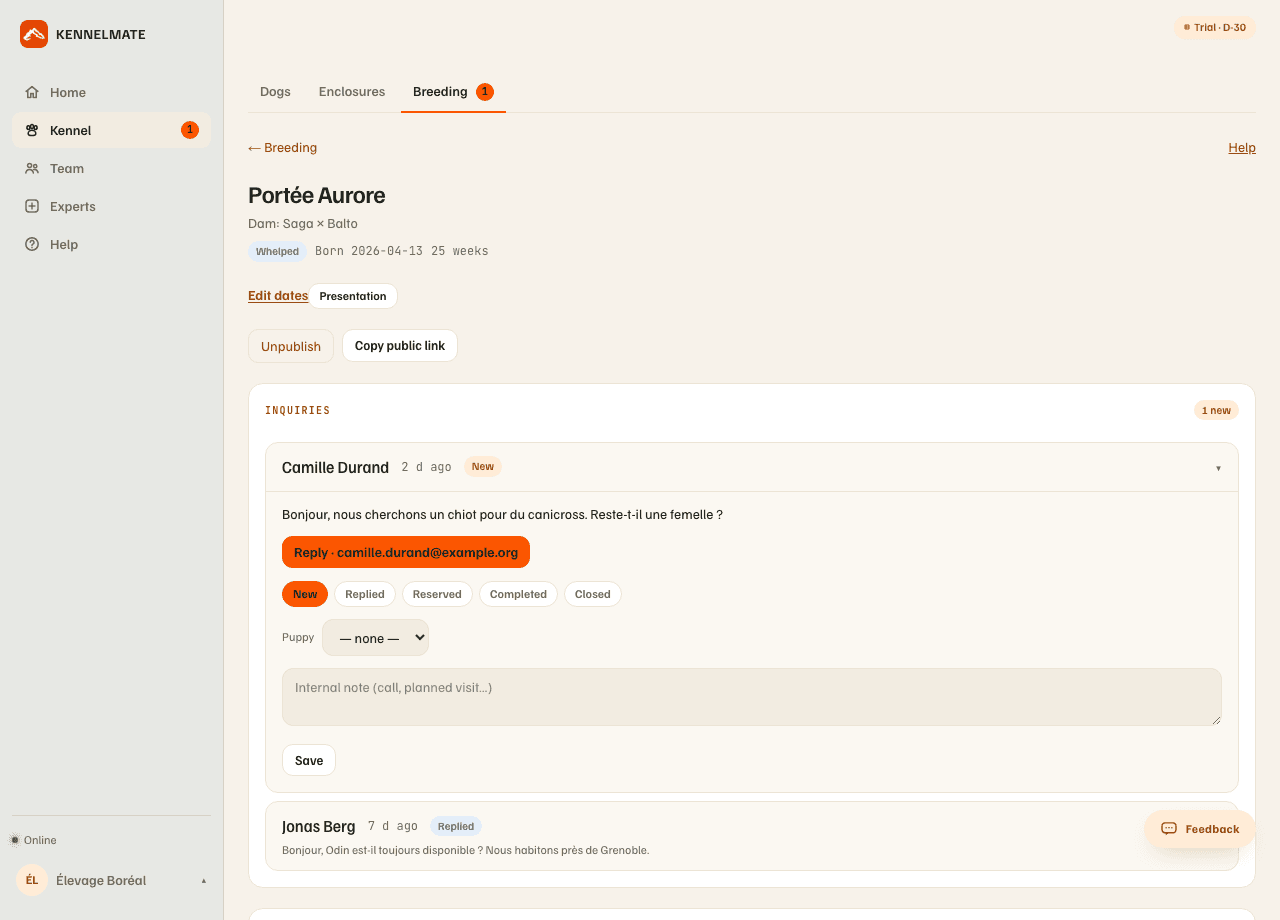
- Receive the inquiries: each message sent from the page lands in "Inquiries", on the litter itself, most recent first; a red counter shows on "Breeding".
- Move each inquiry along with one click: New → Replied → Reserved → Completed, or Closed. "Reply" opens your mail app to the visitor's address; "Puppy" links the inquiry to a puppy; the "Internal note" keeps a call or a planned visit.
- Once the inquiry is linked to a reserved or completed puppy, a "Handover pack" link opens its document: the puppy's identity, the formalities of the buyer's country (eight countries studied — including France, Switzerland and Belgium — plus a generic template), health record, next vaccine or deworming reminders, instructions to hand to the buyer. Check it against your studbook: it isn't legal advice.
What you should see
- The "Unpublish" and "Copy public link" buttons in place of "Publish".
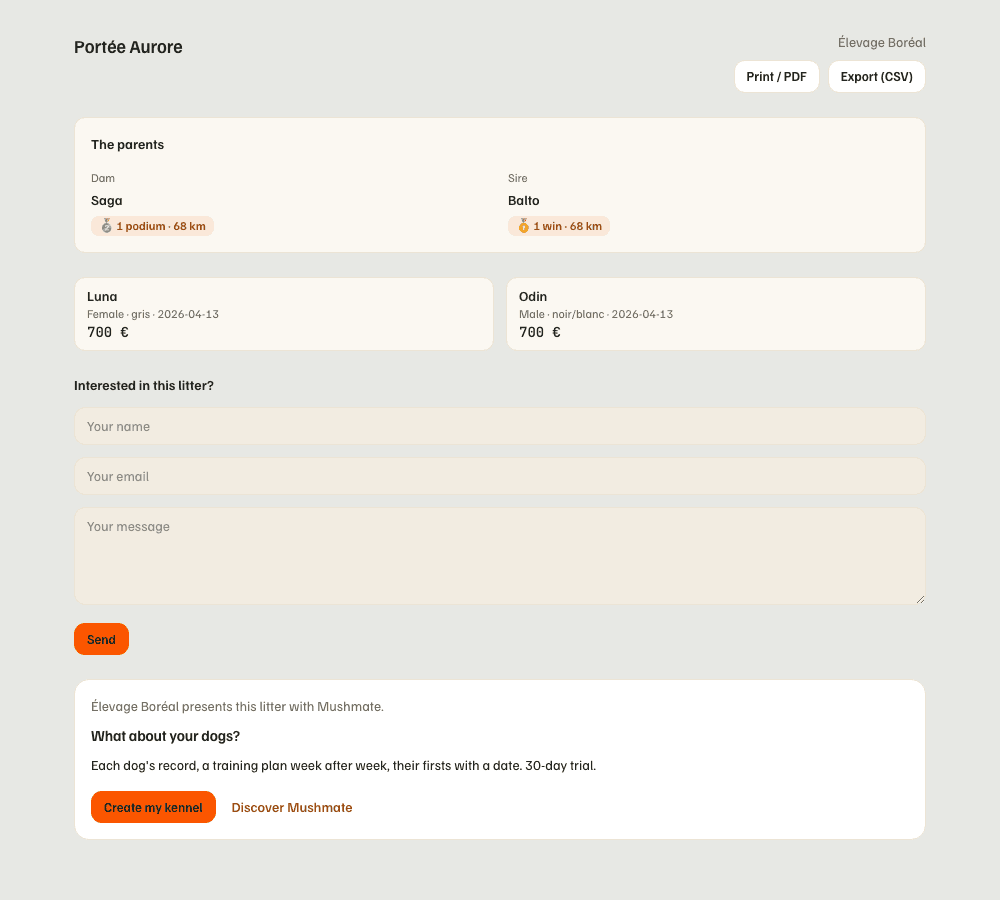
- On the public page: the litter's name, then "The parents" (the dam and sire with their photo, a studbook number marked "self-declared, not verified", their race record if they have one, and a "See the pedigree" link if you entered it), then "Why this pairing", then every puppy still available: photo, name, sex, coat, birth date, price if set, destination, description.
- An unavailable puppy only shows that mention.
- After sending a message, the visitor reads "Thanks, your message has been sent to the breeder."
What others see
- Any visitor, without an account, sees the page: that is what it is for. The "Print / PDF" and "Export (CSV)" buttons (the list of puppies) are there too.
- A parent's photo and pedigree link only show for a parent of your kennel: a sire from another kennel, or outside MushMate, only has a name.
- The visitor never sees your private notes (the litter's or the puppies'), nor your weighings and care.
- At the bottom of the page, an invitation to MushMate ("Your kennel presents this litter with Mushmate", "And your dogs?"): it only names your kennel, already at the top of the page, and doesn't appear when printing. It records nothing about your visitors.
What it does not do
- No public directory: no list of litters from all kennels. Your page can only be found through its link.
- Nothing is verified: the studbook number is self-declared, hence the mention.
- No automatic reply: MushMate doesn't answer for you; "Reply" opens your mail app.
- No payment: a deposit or a price can be noted ("Price / reserve") but nothing is collected in MushMate.
- No legal advice in the handover pack: the formalities are indicative.
If something goes wrong
- "Couldn't publish": turn on "Public litters" in Settings, then try again.
- A litter must no longer be visible: "Unpublish"; the page stops opening.
- Inquiries don't arrive: check that the litter is published and open the link without being signed in. The form doesn't send if a field is empty.
- On the phone, the "Litters" space of the Kennel carries the temperature, the puppies and the publication switch; inquiries can be read and answered by e-mail there, but the internal note, the linked puppy and the handover pack stay on the web.
Going further
- Handing over a puppy's logbook: when a puppy goes to a musher.
- What the buyer sees: the public page, then the handover link.
- Breeding: the complete reference.