What you will do
Bring someone into your kennel — a teammate, a vet, a seasonal helper — with a role that decides what they see and what they can change. Later, change that role, cut an access, or hand ownership to someone else.
What you need
- The kennel's owner role: only the owner invites, changes a role or removes a member.
- The email address the person will sign in with. The invitation is tied to that address.
- The web: the "Members" tab has no phone equivalent, and joining a kennel through an invitation link is done in a browser.
Step by step
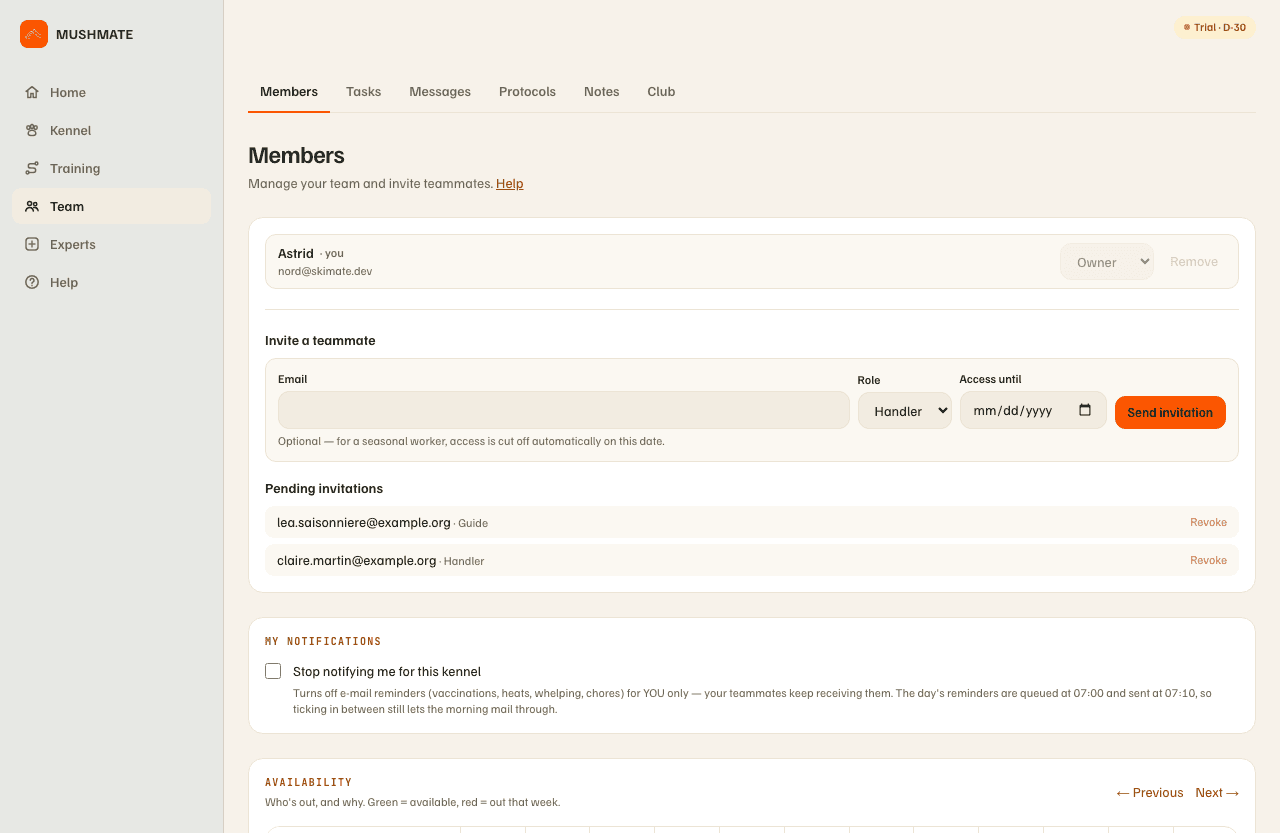
- Open Team › Members. Below the list of your team, the "Invite a teammate" form.
- Type the person's email, exactly the one they will sign in with.
- Pick the role. Handler is offered by default; the five roles are described below.
- If the access should stop by itself, fill in "Access until" (optional): for a seasonal worker, access is cut off automatically on that date. An owner cannot have a time-limited access.
- Click "Send invitation". MushMate emails the person — delivery is not guaranteed, hence the next step — and the invitation shows up under "Pending invitations".
- If the email doesn't arrive, copy the "Invite link (share if the email doesn't arrive)" shown under the form and send it yourself, by message or in person. The link is valid for 14 days.
- The person joins. They sign up normally (their own account and password), or sign in if they already have one, with the invited address. The invitation appears on their screen with a "Join the kennel" button; they can also open the link they received. Once confirmed: "You've joined the kennel."
- Later, in the "Members" list: the "Member role" selector changes a role, "Remove" ends an access (after confirmation), and an "Access until" date can be set or changed on any member who is not an owner.
What you should see
- The pending invitation: the address and the role, with "Revoke" to cancel it as long as it hasn't been accepted.
- The message: "Invitation created." or, if the sending couldn't be confirmed, "Invitation created, but we couldn't confirm the email was sent. Share the link below instead."
- In the list, once accepted, the person and their role; a limited access shows "until" its date, then "expired" once it has passed.
What others see
-
The five roles, one line each:
Role What they do day to day Owner See and change everything — and only the owner can invite, remove, change roles, create task templates, restore a backup. Handler Works with the dogs and the runs; keeps Breeding and Gear in their menu; can import a batch of runs. Vet Care: creates and edits protocols, imports a document; their menu has no Stats, Timing or Gear. Viewer Reads without changing: no Tasks tab, no message to post. They can still set their own absences and write a note. Guide A trail or observation helper: their menu has no Breeding, Timing or Gear. -
The invited person sees the kennel according to their role, as soon as they arrive. Your first name (or, failing that, your address) is shown to them in the members, availability, messages and notes; they also see the weight you entered, next to your name in "Who is driving?".
-
Pending invitations are visible to you only, the owner: a teammate sees neither who is invited, nor with which role.
What it does not do
- Nothing can be invited from the phone, and joining a kennel through a link is done in a browser; the kennel then appears at the next launch of the app, with the same account. On the phone, Settings shows the teammate list read-only.
- A link doesn't pass to someone else: an invitation meant for an address other than the signed-in account's is refused, with a message that says why.
- A menu that hides a screen is not a lock: the menu removes what a role doesn't need, but a screen missing from the menu stays reachable by its address, and what can be changed there always follows the role.
- An owner has no end date, and the kennel keeps at least one owner: the last one cannot be removed or demoted.
If something goes wrong
- "Already a member — change their role above.": use the "Member role" selector in the list, not a new invitation.
- "This invitation was sent to a different email address.": the person is signed in with another account. They sign out, then sign in again with the address that received the invitation.
- "This invitation has expired." (14 days passed) or "…has already been used or was revoked.": send a new one from the form.
- "This invitation link is not valid.": the link was copied in part; copy it in full again, or send a new link.
- "Your session has expired.": the person signs in again, then reopens the link.
- Handing over: give a teammate the Owner role ("Member role"). It is also what unblocks deleting your account when you share the kennel (Your subscription, your backup and deleting your account).
Going further
- Team: shared tasks, messages, protocols, availability and notes, once the team is together.
- Getting started with MushMate: what the invited person sees when they arrive.