What you will do
Save a trail — a loop you redo —, choose who sees it, follow your times on it and compare your runs with your ghost.
What you need
- A GPS run (or one imported from a GPX file, or a race) you have already done, or a GPX file of a trail.
- The owner role to save a trail and choose who sees it; other roles read.
Step by step
- Save the loop: on a run's page, "Save this trail". Choose its name, discipline and surface; MushMate copies the line, the distance and the climb — neither the date, nor the dogs, nor the pace. The trail is born private.
- Or import a GPX: "Import a trail" (by file or URL), or "+ Trail" to enter it without a file (name, distance, climb, discipline, surface — no map).
- Open Traces › Trails. Your saved trails come first, each with who sees it (private, shared with a club, public) and the runs that match it; then the detected trails, your clubs' trails and the public trails.
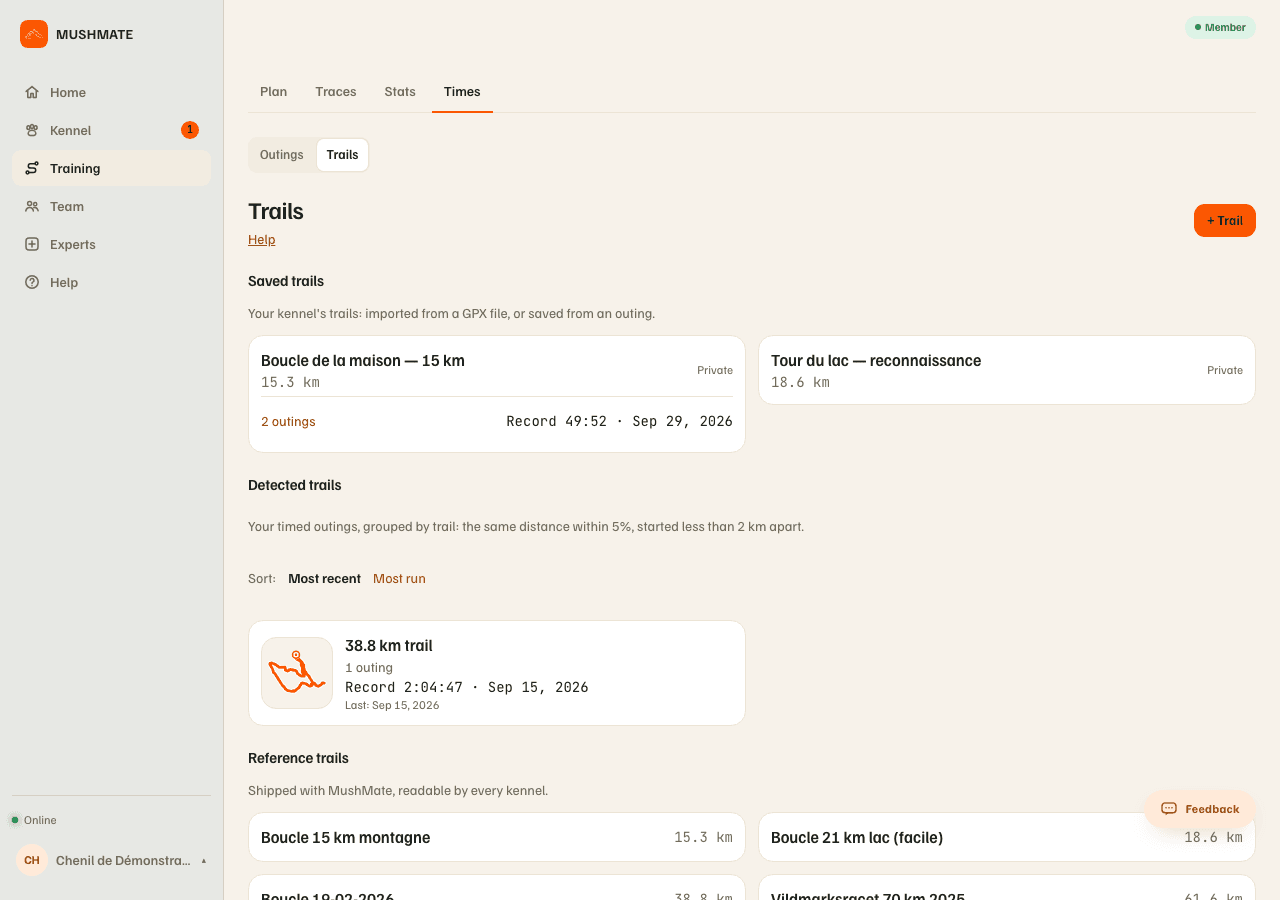
- Choose who sees it, on the trail's page ("Who sees it"). "Make public": all of MushMate sees its name, distance, climb and line, without your kennel's name — never its pace. "Share with" one of your clubs: its members see it, with your kennel's name; "Remove from" that club closes it again.
- Follow your times: a trail's sheet carries your runs that follow it (start within 2 km of its start, distance within 5 % of its own), your record, your latest and the progression curve. For a time with no GPS, "Manual session" › "Trail (optional)" logs it as "entered".
- Compare with the ghost: the "Ghost" block of a timed run gives the gap at the finish and its five sections; "Compare with…" offers the other runs of the same trail.
What you should see
- "Saved:" followed by the trail's name, in place of the button, on a run that already matches one of your trails.
- Your record and your progression on the trail's sheet.
- The leaderboards, when the trail is shared or public: the club's (for the kennels that show their times to THAT club) and the public one. See The club's trails and your times.
What others see
- A private trail: only you (your kennel).
- Shared with a club: its members see its name, distance, climb, line and your kennel's name — never the pace.
- Public: all of MushMate sees its name, distance, climb and line, without your kennel's name.
- Only the time leaves a leaderboard: the kennel's name, the time brought back to the trail's distance, the run's real distance and its date — never the run, its passing times or its line.
What it does not do
- A run entered by hand has no line: it can't be saved as a trail. Neither can a session imported from Strava (Strava's agreement reserves its track to the person who imported it): import your watch's GPX instead.
- A private trail has no leaderboard, even for your kennel; neither does a "Long" trail.
- An entered time never counts in a leaderboard: only measured times rank.
- The public leaderboard doesn't count as an agreement for a club, and vice versa: the two are set separately.
If something goes wrong
- No "Save this trail" button: the run is entered by hand, imported from Strava, or has no track; or you aren't the owner.
- Your run doesn't show on the trail: its start is more than 2 km away, or its distance more than 5 % off the trail's.
- On the phone, "Save this trail" and "Make public / private" are on a trail's sheet and on a run's review, with a network; sharing with a club is done on the website (or in the club screen).
Going further
- Times: your trails' times: the complete reference.
- Rereading a run.